

Download 2048 Gamer – Free Mac Entertainment App, Classic Puzzle Game
Overview
2048 Gamer is a free, lightweight entertainment program designed exclusively for macOS users who love classic puzzle challenges. Developed by LUCKY GIRLS LIMITED, this app brings the addictive “2048” tile‑sliding game to the Mac desktop, offering a seamless blend of casual fun and strategic depth. Whether you’re a seasoned puzzle veteran or a newcomer looking for a quick brain‑exercise during a coffee break, 2048 Gamer delivers an intuitive interface, vibrant graphics, and smooth animations that feel native to the Apple ecosystem.
The program is fully localized in English, making it accessible to a global audience, and it requires no registration, in‑app purchases, or intrusive ads—just a pure, free‑to‑play experience. Its design follows Apple’s Human Interface Guidelines, ensuring that the controls feel natural whether you’re using a trackpad, mouse, or keyboard shortcuts. With regular updates that address performance tweaks and introduce subtle visual enhancements, 2048 Gamer remains a reliable choice for anyone seeking a timeless puzzle game on macOS.
Key Features
- Classic 2048 Gameplay: Slide numbered tiles on a 4×4 grid to combine matching numbers and reach the coveted 2048 tile.
- Mac‑Optimized Interface: Clean, Retina‑ready graphics that scale perfectly on every Mac screen, from MacBook Air to iMac.
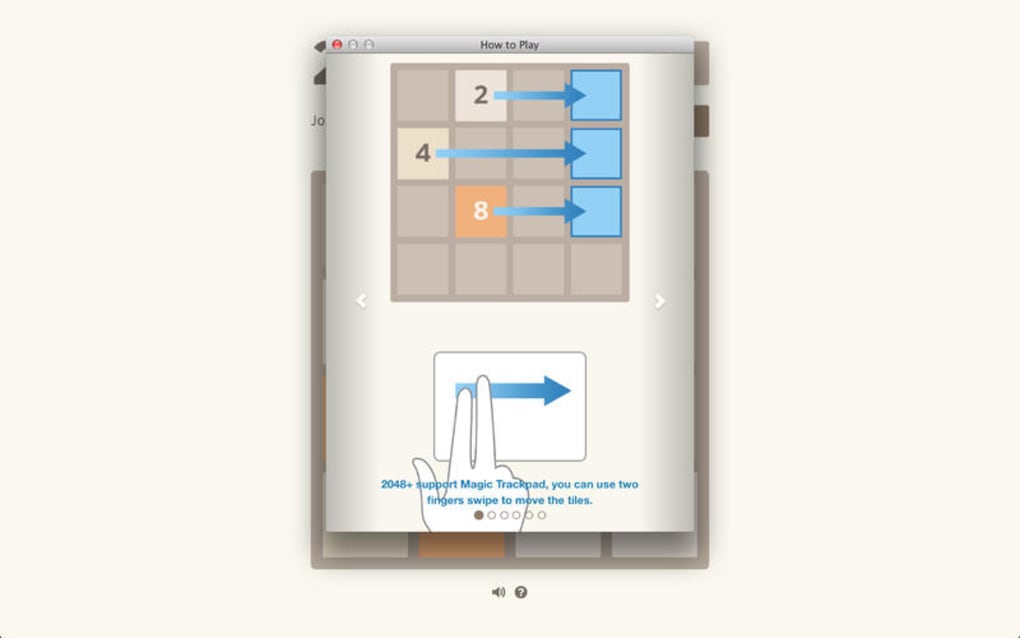
- Keyboard & Trackpad Support: Play using arrow keys, WASD, or intuitive swipe gestures on a trackpad.
- Unlimited Undo & Replay: Undo your last move or replay previous sessions to analyze strategies.
- Score Tracking & Leaderboard: Built‑in high‑score board lets you compare your best runs with friends via iCloud sync.
- Customizable Themes: Choose from light, dark, and high‑contrast themes to match your macOS appearance preferences.
- Offline Play: No internet connection required; the game runs entirely on your device.
- Regular Updates: Free updates improve stability, add minor visual tweaks, and ensure compatibility with the latest macOS releases.
Installation, Usage & Compatibility
Installing 2048 Gamer on your Mac is straightforward and requires no technical expertise. Follow these steps to get the game up and running in under five minutes:
- Download the installer: Visit the official LUCKY GIRLS LIMITED website or a trusted macOS software repository and click the “Download 2048 Gamer” button. The file will be a
.dmgdisk image. - Open the DMG: Double‑click the downloaded file; macOS will verify the package and mount a virtual drive on your desktop.
- Copy to Applications: Drag the 2048 Gamer icon into your
Applicationsfolder. This step ensures the app is stored in the standard location for macOS applications. - Launch the app: Open
Applications, locate 2048 Gamer, and double‑click to start. The first launch may prompt a security warning; choose “Open” to allow the app to run. - Configure preferences: In the menu bar, select Preferences to adjust theme, enable/disable undo, and set up iCloud sync for leaderboards.
Compatibility: 2048 Gamer is built for macOS 10.13 (High Sierra) and later, including macOS Ventura, Sonoma, and future releases. The app runs natively on Intel‑based Macs as well as Apple Silicon (M1, M2, and later) thanks to universal binary packaging. Minimum system requirements are modest: 2 GB RAM, 100 MB free disk space, and a GPU capable of supporting basic 2D graphics.
Once launched, the game board appears centered on the screen. Use the arrow keys or swipe gestures to move tiles. The UI includes a real‑time score counter, a “New Game” button, and an “Undo” icon for the most recent move. The settings panel lets you toggle sound effects, choose a visual theme, and enable automatic cloud backup of high scores. If you encounter any issues, the built‑in Help menu links to a troubleshooting page that covers common problems such as permissions errors or display scaling glitches.
Pros and Cons
Pros
- Completely free with no hidden fees or ads.
- Optimized for macOS, offering smooth performance on both Intel and Apple Silicon hardware.
- Intuitive controls that work with keyboard, mouse, and trackpad.
- Offline gameplay means you can enjoy the puzzle anywhere, anytime.
- Customizable themes and unlimited undo enhance the user experience.
- Regular, hassle‑free updates keep the app secure and compatible with new macOS versions.
Cons
- Lacks multiplayer or social sharing features beyond iCloud leaderboards.
- No in‑game tutorial for absolute beginners; new players may need to read external guides.
- Limited visual customization compared to some third‑party 2048 clones.
- Only available for macOS; no Windows, Android, or iOS versions at this time.
FAQ & Conclusion
Is 2048 Gamer truly free or are there hidden costs?
Yes, 2048 Gamer is completely free. There are no in‑app purchases, subscription fees, or ads. All features, including undo and theme customization, are available at no cost.
Can I play 2048 Gamer on a Windows PC?
Currently the app is exclusive to macOS. Windows users will need to look for alternative 2048 clones that are built for the Windows platform.
Does 2048 Gamer support Apple Silicon (M1/M2) Macs?
Yes. The program is compiled as a universal binary, meaning it runs natively on both Intel and Apple Silicon Macs, delivering the same smooth performance on all devices.
How do I reset my high scores if I want a fresh start?
Open the Preferences panel, navigate to the “Scores” tab, and click “Reset High Scores.” Confirm the action, and all stored scores will be cleared.
Is there any way to back up my game data?
Yes. When you enable iCloud sync in the Settings, your high scores and preferences are automatically backed up to your iCloud account, allowing you to restore them on any Mac signed in with the same Apple ID.
Conclusion
If you own a Mac and enjoy quick, brain‑stimulating puzzles, 2048 Gamer stands out as a polished, free, and secure option. Its native macOS performance, clean UI, and thoughtful features such as unlimited undo and iCloud leaderboard sync make it a must‑have addition to your entertainment toolkit. While the lack of cross‑platform support and multiplayer modes might disappoint power users, the core gameplay remains addictive and perfectly suited for short sessions or extended play. Download 2048 Gamer today, dive into the sliding‑tile challenge, and see how many times you can beat the 2048 milestone!







